Available on steam


The result
Immersive merchant simulator in a medieval setting
- RPG
- Trading Simulator
- Combat & Recruitment
- Quests & Events
Immersive merchant simulator in a medieval setting
- RPG
- Trading Simulator
- Combat & Recruitment
- Quests & Events
conditions
- 4 months
- Team of 5 to 12 people
- No artists
- No programmers (pretty much)
Most of the team was not well-versed with UE4
- 4 months
- Team of 5 to 12 people
- No artists
- No programmers (pretty much)
Most of the team was not well-versed with UE4
Trailer
Summary
Product Owner
I, as a Product Owner of the project, communicated and oversaw different "sub-teams" & ensured a unified vision of the game & development, organized documentation.
As a de-facto Team Leader, I had to resolve conflicts and set priorities for the development as well.
Additionally, I've been responsible for the Steam release of the game.
I, as a Product Owner of the project, communicated and oversaw different "sub-teams" & ensured a unified vision of the game & development, organized documentation.
As a de-facto Team Leader, I had to resolve conflicts and set priorities for the development as well.
Additionally, I've been responsible for the Steam release of the game.
Gameplay Design
I've developed initial ideas and concepts.
The game is essentially a Merchant simulator, where the player has to travel across multiple villages, trading, completing quests and events.
The game allows the player to recruit additional crew members and fight back bandits.
I've developed initial ideas and concepts.
The game is essentially a Merchant simulator, where the player has to travel across multiple villages, trading, completing quests and events.
The game allows the player to recruit additional crew members and fight back bandits.
Technical Design
I had to design and implement a lot of systems for the game via UE4's Blueprints.
And work with UE4's UI solutions.
I had to design and implement a lot of systems for the game via UE4's Blueprints.
And work with UE4's UI solutions.
Sound Design
From choosing background music, to UI interactions, the entirety of the Sound Design in the game was on me.
Audition, FMOD and a lot of royalty free music helped me to achieve that.
From choosing background music, to UI interactions, the entirety of the Sound Design in the game was on me.
Audition, FMOD and a lot of royalty free music helped me to achieve that.
Art Direction
We had many assets from many different packs, so I made sure they all look fitting.
To achieve that, on top of other measures, I suggested to create and apply Voronoi shader for the majority of materials.
It worked!
We had many assets from many different packs, so I made sure they all look fitting.
To achieve that, on top of other measures, I suggested to create and apply Voronoi shader for the majority of materials.
It worked!
Introduction
Some Lore
This was our largest project in our education, both in scope and length.
Team composition initially consisted of designers only, later more designers, a programmer and UI/UX artist joined us.
Most of the designers were not proficient in UE4, so I had to do a lot in many areas simultaneously.
Game Idea
We had to come up with ideas for the game and then vote on them, my idea has won!
Besides looking interesting, the main appeal of the merchant simulator was that the game could be done in it's entirety by designers.
Some Lore
This was our largest project in our education, both in scope and length.
Team composition initially consisted of designers only, later more designers, a programmer and UI/UX artist joined us.
Most of the designers were not proficient in UE4, so I had to do a lot in many areas simultaneously.
Game Idea
We had to come up with ideas for the game and then vote on them, my idea has won!
Besides looking interesting, the main appeal of the merchant simulator was that the game could be done in it's entirety by designers.
Product Ownership
Endeavors of Mine
My Role
Since the idea for the game was suggested by me, I've also suggested to be a Product Owner for the project, and the team has agreed.
Though my supposed responsibilities have been to keep a unified vision for the game and make sure everyone is on the same page, my actual responsibilities have exceeded far beyond that, but let's keep the order.
Agile Board
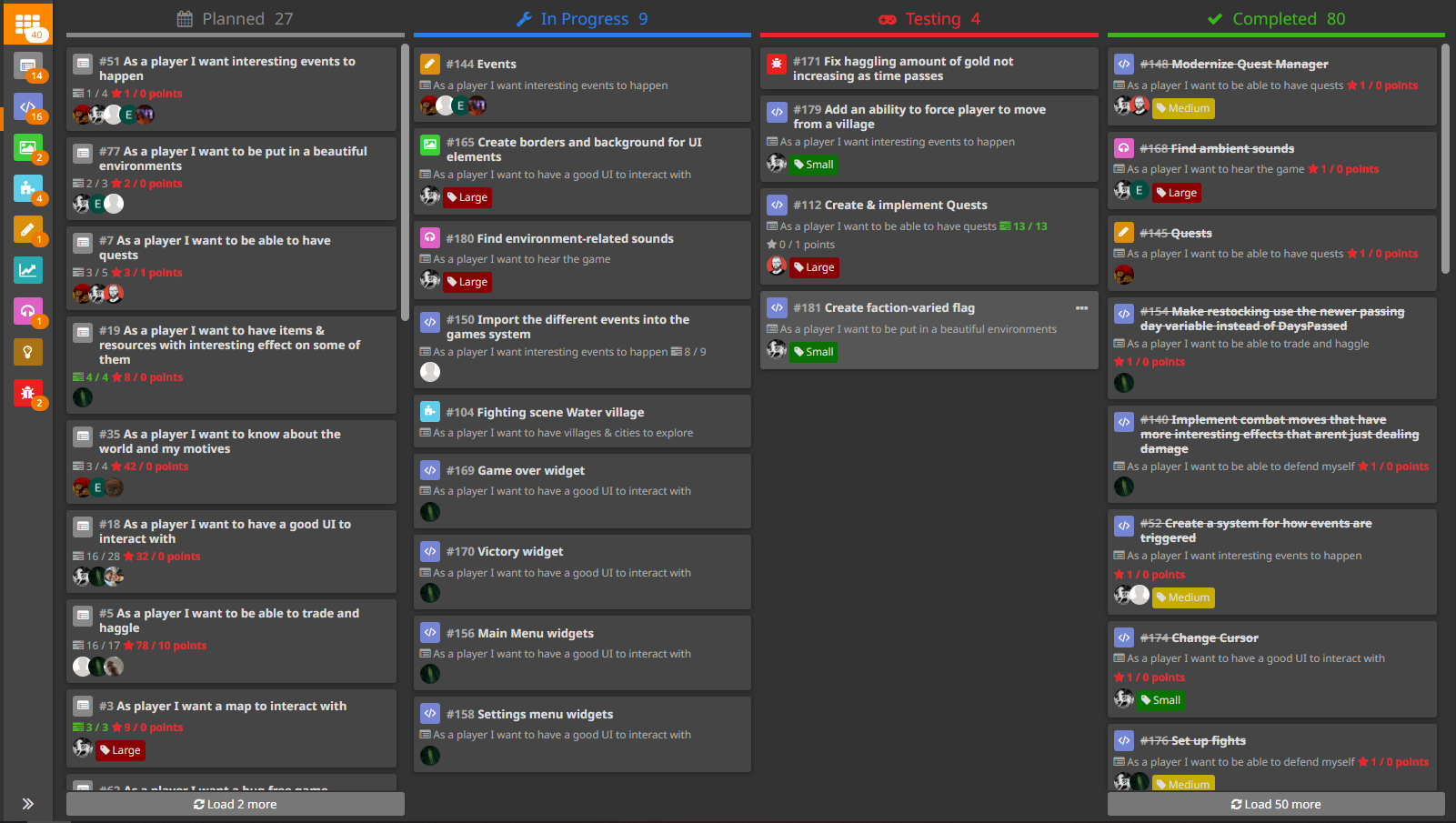
As a Product Owner, I've called for making the Scrum Board in Hack n' Plan.
This is how it looked during final days of development:
Endeavors of Mine
My Role
Since the idea for the game was suggested by me, I've also suggested to be a Product Owner for the project, and the team has agreed.
Though my supposed responsibilities have been to keep a unified vision for the game and make sure everyone is on the same page, my actual responsibilities have exceeded far beyond that, but let's keep the order.
Agile Board
As a Product Owner, I've called for making the Scrum Board in Hack n' Plan.
This is how it looked during final days of development:
Meetings
Then, I've held daily meetings, one in the morning, one at the end of each day.
This, besides me constantly talking to everyone on the team, has helped immensely to keep everyone updated on the state of the project.
During the morning meeting we talked about our plans for the day and about any possible help that one person might need from another.
During our "end-of-the-day" meetings, we focused on what each of us achieved during the day and we also used this time to keep source control in check.
Documentation
Additionally, I set the tone for the team to document everything that needs to be documented and to keep it in one place that I prepared by that time.
Then, I've held daily meetings, one in the morning, one at the end of each day.
This, besides me constantly talking to everyone on the team, has helped immensely to keep everyone updated on the state of the project.
During the morning meeting we talked about our plans for the day and about any possible help that one person might need from another.
During our "end-of-the-day" meetings, we focused on what each of us achieved during the day and we also used this time to keep source control in check.
Documentation
Additionally, I set the tone for the team to document everything that needs to be documented and to keep it in one place that I prepared by that time.
Less Obvious Responsibilties
Team Lead
Now to my less obvious deeds - as a de-facto Team Leader, I had to make difficult decisions, schedule our roadmap, resolve personal conflicts within the team and more.
Steam Release
Another major task I had was to publish the game on Steam.
I had no prior experience in doing that, so I had to educate myself about Steamworks with little documentation on how to prepare, assemble and upload a build.
On top of that, I had to make all store assets including the trailer.
Team Lead
Now to my less obvious deeds - as a de-facto Team Leader, I had to make difficult decisions, schedule our roadmap, resolve personal conflicts within the team and more.
Steam Release
Another major task I had was to publish the game on Steam.
I had no prior experience in doing that, so I had to educate myself about Steamworks with little documentation on how to prepare, assemble and upload a build.
On top of that, I had to make all store assets including the trailer.
I have to admit, the project lacked any proper QA up until beta.
Due to the deficiency of people working in-engine, development of any system that could be tested took an unreasonable amount of time.
Due to the deficiency of people working in-engine, development of any system that could be tested took an unreasonable amount of time.
Gameplay Design
Inception
Conception
I've cpme up with the idea for this project & it was selected by vote within our team.
The idea came out of necessity for something doable by the team of designers.
It was inspired by FTL: Faster Than Light, but the idea was to focus on enterprise rather than combat.
And as a side note, every gameplay idea was discussed amongst the team.
But as a Product Owner and a "vision holder", most of the time I made final decisions, for better or worse.
One of the designers was especially imbued with the idea and the vision, that he suggested to help me (and in some cases completely cover me) in designing the game, big props to you, Mr. E!
Idea
Inception
Conception
I've cpme up with the idea for this project & it was selected by vote within our team.
The idea came out of necessity for something doable by the team of designers.
It was inspired by FTL: Faster Than Light, but the idea was to focus on enterprise rather than combat.
And as a side note, every gameplay idea was discussed amongst the team.
But as a Product Owner and a "vision holder", most of the time I made final decisions, for better or worse.
One of the designers was especially imbued with the idea and the vision, that he suggested to help me (and in some cases completely cover me) in designing the game, big props to you, Mr. E!
Idea
Initial Sketch of the Map
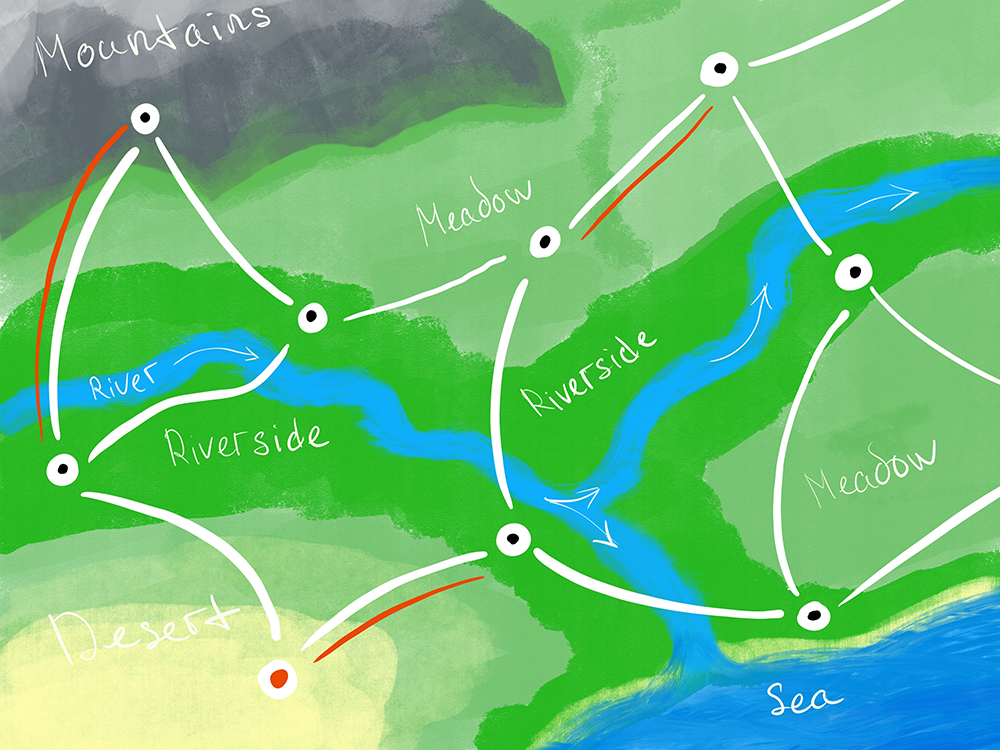
Then, I've done a few sketches to better telegraph my idea to the team.
The player takes the role of a merchant that travels across the land in an attempt to make a bank.
The player has to choose from one of 3 starting archetypes that vary in stats and starting equipment.
On their journey, they encounter different villages of one of 4 types.
Each village type has a unique flavor to it and price tendencies for resources and items. This serves as a main "money maker engine" for the player.
For example, fishing villages are rich in food, but steel is a scarce resource in them, yet the opposite is the case for mountain villages.
Design Pillars
After the team was on board with the vision for the game, we've sat down, created GDD and wrote down design pillars:
1. Risk Management
The player should always be considerate about trade-offs and consequences of their actions and choose wisely.
2. Exploration
The world is for the player to explore.
3. Enterprise
The player is encouraged to make deals and seek profit.
Paper Prototype
Then, thanks to Mr. E, we tested the game with a "paper prototype".
Due to the remote nature of work in this project, it was conducted in Tabletop Simulator.
In several rounds of testing, we tried various game modes, mechanics, and the first draft of in-game economy.
After we felt comfortable with the paper prototype, we started building the game in the engine.
The player takes the role of a merchant that travels across the land in an attempt to make a bank.
The player has to choose from one of 3 starting archetypes that vary in stats and starting equipment.
On their journey, they encounter different villages of one of 4 types.
Each village type has a unique flavor to it and price tendencies for resources and items. This serves as a main "money maker engine" for the player.
For example, fishing villages are rich in food, but steel is a scarce resource in them, yet the opposite is the case for mountain villages.
Design Pillars
After the team was on board with the vision for the game, we've sat down, created GDD and wrote down design pillars:
1. Risk Management
The player should always be considerate about trade-offs and consequences of their actions and choose wisely.
2. Exploration
The world is for the player to explore.
3. Enterprise
The player is encouraged to make deals and seek profit.
Paper Prototype
Then, thanks to Mr. E, we tested the game with a "paper prototype".
Due to the remote nature of work in this project, it was conducted in Tabletop Simulator.
In several rounds of testing, we tried various game modes, mechanics, and the first draft of in-game economy.
After we felt comfortable with the paper prototype, we started building the game in the engine.
Gameplay Mechanics
Game Mode
We've tested several game modes, but the one that seemed like the best fit was "race against time", in which the player has to earn as much money as they can in a fixed amount of time.
For us it felt like it provided both freedom for the player and a clear goal.
After 20 days, each of 3 player archetypes' character has 3 unique endings based on how much gold the player managed to earn.
Villages
Villages are the focal point of the whole game.
There are 4 types of villages: desert, plain, fishing and mountain.
Each has a unique visual appearance, music and trading specifics.
Take a look at a plain Village to fuel your imagination:
Game Mode
We've tested several game modes, but the one that seemed like the best fit was "race against time", in which the player has to earn as much money as they can in a fixed amount of time.
For us it felt like it provided both freedom for the player and a clear goal.
After 20 days, each of 3 player archetypes' character has 3 unique endings based on how much gold the player managed to earn.
Villages
Villages are the focal point of the whole game.
There are 4 types of villages: desert, plain, fishing and mountain.
Each has a unique visual appearance, music and trading specifics.
Take a look at a plain Village to fuel your imagination:
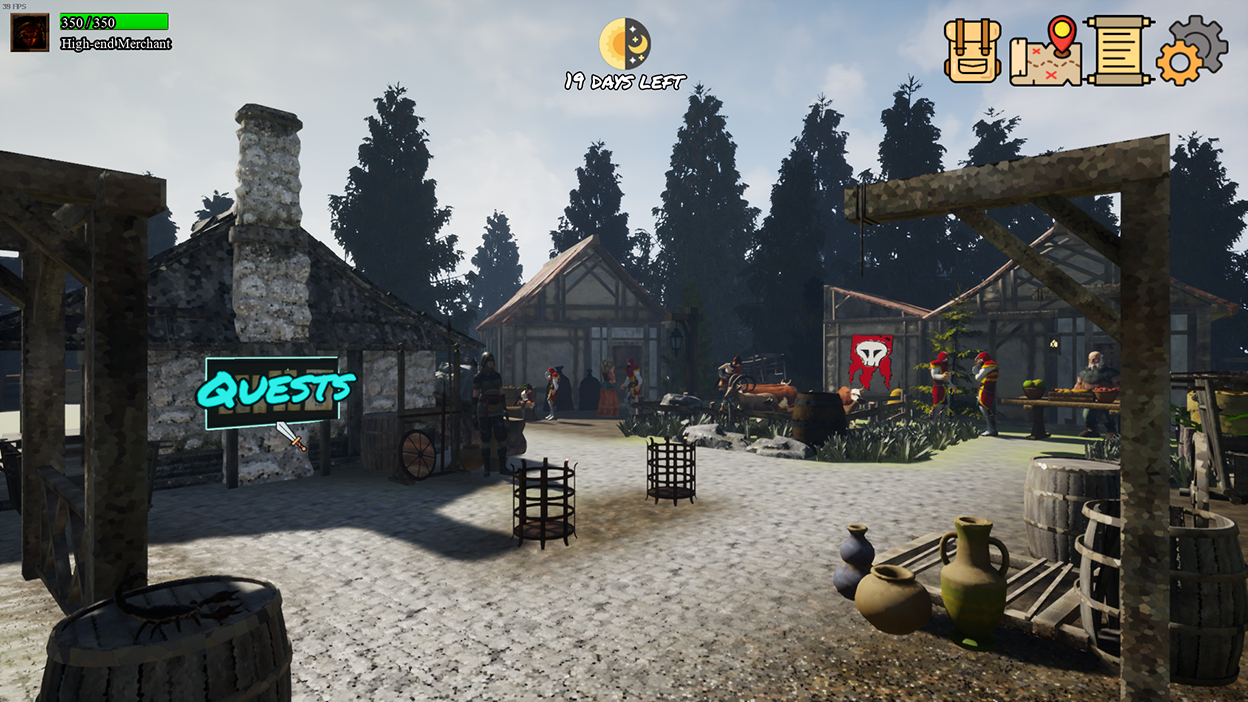
Each village serves as a hub to various game systems, they are present in a form of places in a village:
- Shop
A place to buy and sell various resources and items.
- Crew corner
A place to recruit potential crew mates.
- Faction house
Allows the player to trade with a faction to gain their favor and valuable items.
- Quest board
A board where the player can pick up quests.
Each time the player trades, the time passes and there is a chance to trigger village events.
- Shop
A place to buy and sell various resources and items.
- Crew corner
A place to recruit potential crew mates.
- Faction house
Allows the player to trade with a faction to gain their favor and valuable items.
- Quest board
A board where the player can pick up quests.
Each time the player trades, the time passes and there is a chance to trigger village events.
Shop & Haggling
A shop can be found in any village.
Shops offer various resources and items, but pricing and even availability depends on a village type of a shop.
Here's a price table for each village type:
A shop can be found in any village.
Shops offer various resources and items, but pricing and even availability depends on a village type of a shop.
Here's a price table for each village type:

As you can see, what is a waste for one village is a treasure for another.
After the player selects things they want to buy & sell, they can buy it immediately or try to haggle for a better price.
This is how haggling screen looks:
After the player selects things they want to buy & sell, they can buy it immediately or try to haggle for a better price.
This is how haggling screen looks:
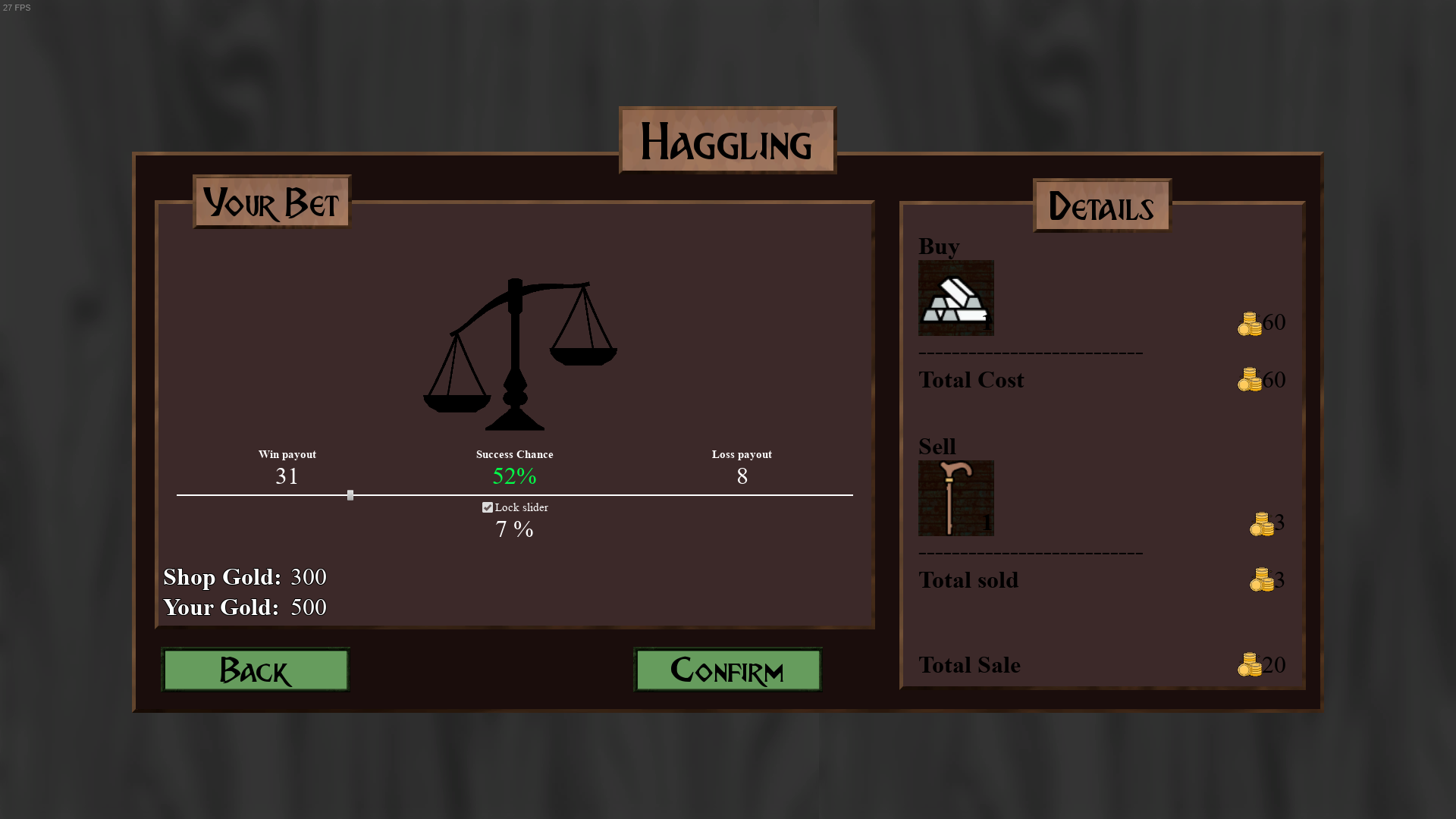
The player can choose the price and the game will show probability of success, haggling stat directly affects it.
On failure, the player will pay the price that is higher than initially.
On failure, the player will pay the price that is higher than initially.
Travel
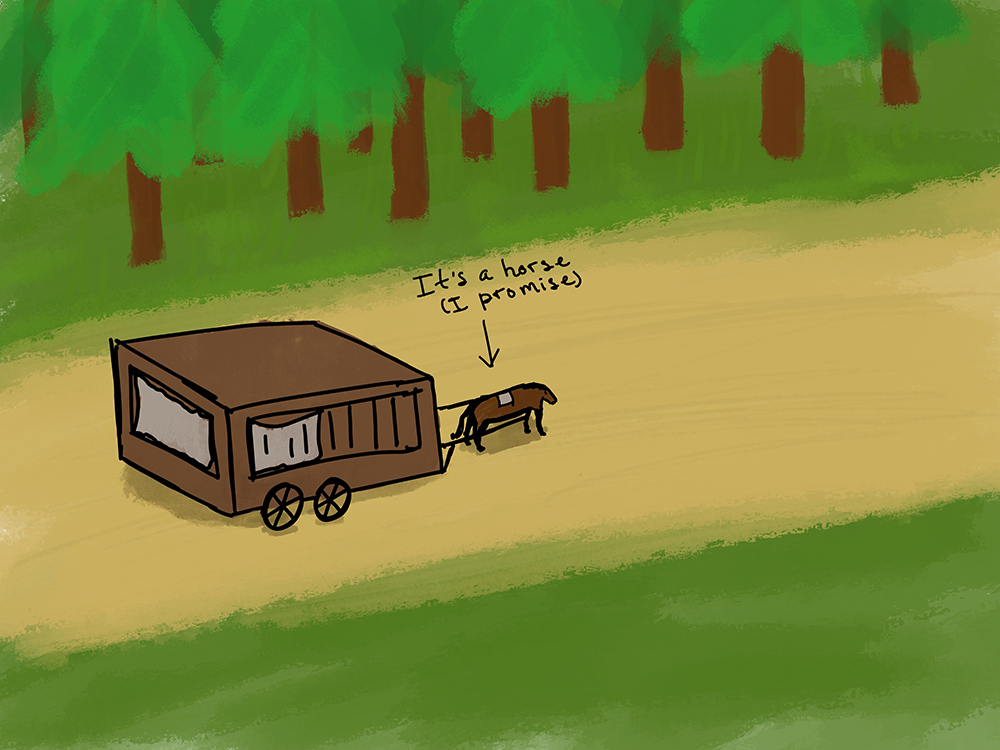
Sketch of Transitory Area
Initially, the idea was that during travel, the player will be put in a transitory area between villages, where they may encounter various characters and events, but on that a bit later.
The idea had good reception, but was deemed out of scope "for now", which in hindsight it was.
However, ambushes and events during travel are still present in the game, although traveling is done via a map.
Events
So, what is an event?
Event is a small text scenario presented to a player with 2 choices that may lead to another 2 choices.
An event may have good, neutral, questionable or bad outcomes: give you rare items, kill one of your crew mates, do literally nothing, etc.
Events occur during the player's stay at any village or during traveling, each quarter of the day there is a chance to trigger an event.
Events provide fun, quick distraction from the main gameplay loop.
The idea had good reception, but was deemed out of scope "for now", which in hindsight it was.
However, ambushes and events during travel are still present in the game, although traveling is done via a map.
Events
So, what is an event?
Event is a small text scenario presented to a player with 2 choices that may lead to another 2 choices.
An event may have good, neutral, questionable or bad outcomes: give you rare items, kill one of your crew mates, do literally nothing, etc.
Events occur during the player's stay at any village or during traveling, each quarter of the day there is a chance to trigger an event.
Events provide fun, quick distraction from the main gameplay loop.
Crew
As the vision of the game quickly developed and evolved, we thought that it would be a good idea to allow the player to recruit characters so that they travel in a group.
As the vision of the game quickly developed and evolved, we thought that it would be a good idea to allow the player to recruit characters so that they travel in a group.
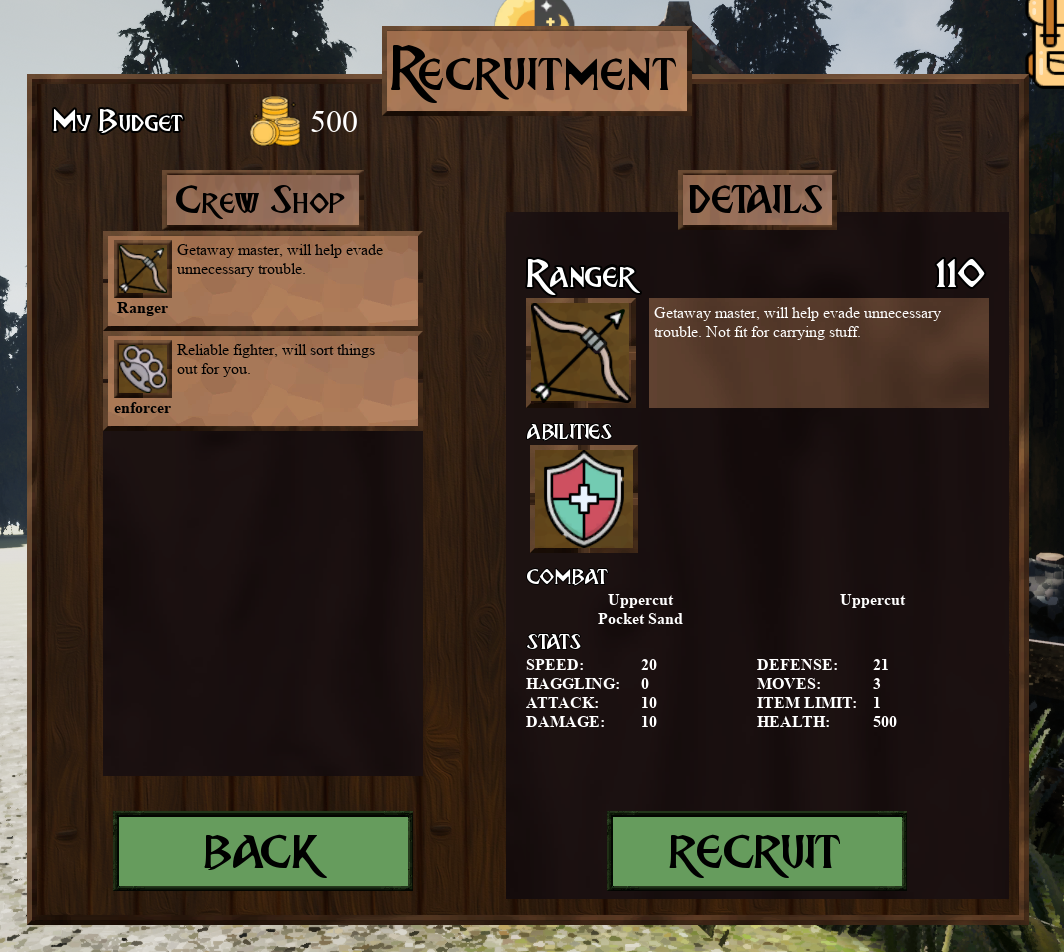
Crew Recruitment UI
There are 3 types of crew mates:
- Merchant
Has good Haggling stat, which helps in trading.
- Enforcer
Is well prepared for combat and has 4 inventory slots.
- Ranger
Decent in combat and has high Speed stat, which helps save time during traveling.
Each village has a chance to generate multiple crew mates to recruit with randomized yet weighted (according each type) stats and a chance to have random combat moves.
The player can use crew mate's inventory slots to store items and resources and if a crew mate dies, the player can recover lost items.
Each day, crew mates consume food, and if the player doesn't have enough to feed everyone, they have to choose who gets to eat and who takes damage.
- Merchant
Has good Haggling stat, which helps in trading.
- Enforcer
Is well prepared for combat and has 4 inventory slots.
- Ranger
Decent in combat and has high Speed stat, which helps save time during traveling.
Each village has a chance to generate multiple crew mates to recruit with randomized yet weighted (according each type) stats and a chance to have random combat moves.
The player can use crew mate's inventory slots to store items and resources and if a crew mate dies, the player can recover lost items.
Each day, crew mates consume food, and if the player doesn't have enough to feed everyone, they have to choose who gets to eat and who takes damage.
Factions
There are 3 factions in the world of Merchant's Rush:
- The Outlaws
- The Shamans of Nature
- Merchant Guild
Each faction has a different narrative flavor and its own territory that's outlined on the map.
Traveling on that territory may put the player in combat with that faction, but good reputation within that faction reduces a chance for conflicts.
Reputation can be gained with quests and directly at a faction's house in any village under a faction's control via special "donations" window.
Quests
Quests are received at a Quest board.
They reward gold and accompany the player along their journey.
There are 3 factions in the world of Merchant's Rush:
- The Outlaws
- The Shamans of Nature
- Merchant Guild
Each faction has a different narrative flavor and its own territory that's outlined on the map.
Traveling on that territory may put the player in combat with that faction, but good reputation within that faction reduces a chance for conflicts.
Reputation can be gained with quests and directly at a faction's house in any village under a faction's control via special "donations" window.
Quests
Quests are received at a Quest board.
They reward gold and accompany the player along their journey.
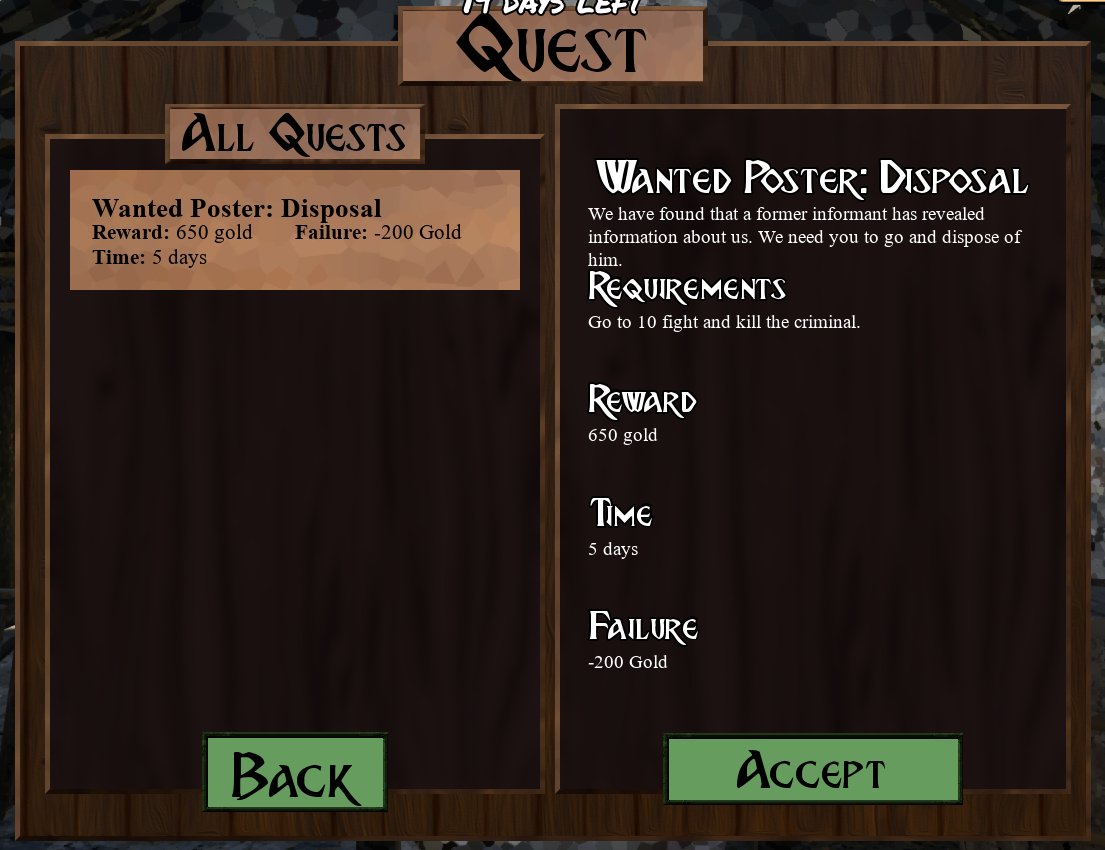
Quest Board
There are 4 types of quests:
- Delivery
The player is given items that they need to deliver to a specific village.
- Escort
And NPC joins the player's crew and needs to be escorted to a specific village in safety.
- Travel
They player either needs to travel to a specific village or travel to N amount of villages.
- Extermination
At a specific village, the player can initiate a fight, winning completes the quest.
Quests have a time limit for completion, but the player can always abandon any quest and pay a "Failure" fine.
Combat
Fights usually occur during traveling, but they can be a consequence of events as well.
Fight is a turn-based brawl between the player's crew and enemies.
This is how it lookg in-game:
- Delivery
The player is given items that they need to deliver to a specific village.
- Escort
And NPC joins the player's crew and needs to be escorted to a specific village in safety.
- Travel
They player either needs to travel to a specific village or travel to N amount of villages.
- Extermination
At a specific village, the player can initiate a fight, winning completes the quest.
Quests have a time limit for completion, but the player can always abandon any quest and pay a "Failure" fine.
Combat
Fights usually occur during traveling, but they can be a consequence of events as well.
Fight is a turn-based brawl between the player's crew and enemies.
This is how it lookg in-game:
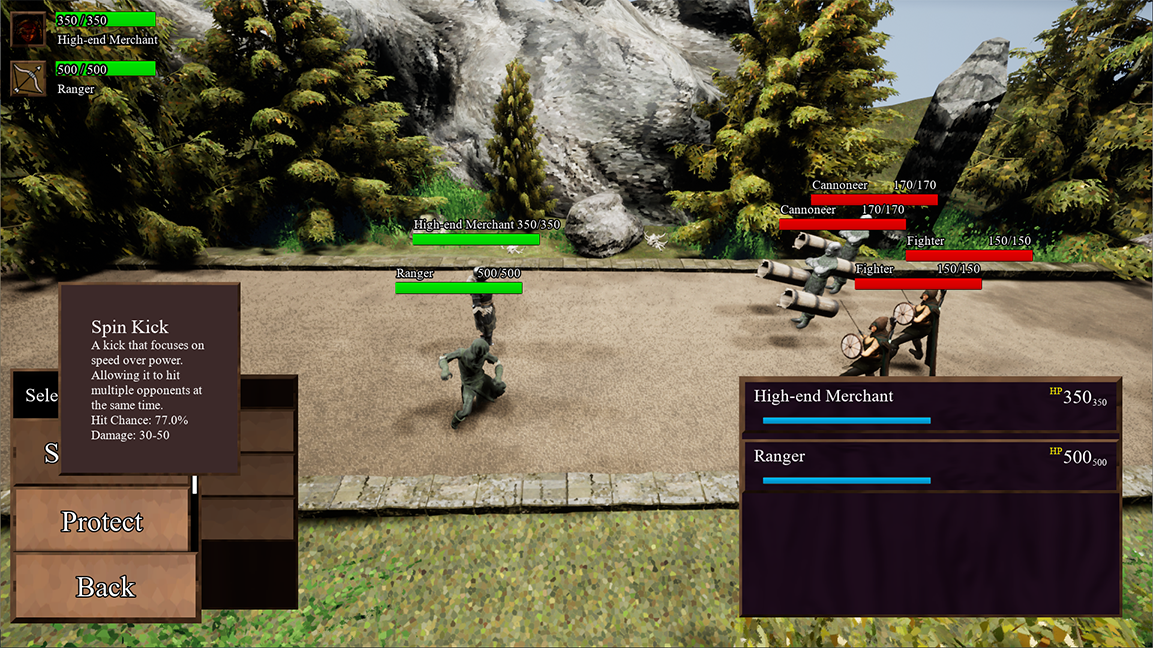
Allies have special moves that can be used in combat. Effects vary from dealing single-target damage, AOE damage, money steal, escape, etc.
The player can also use different items during a battle to aid their team.
When a crew member dies, their items can be recovered by the player, but when an entire party dies - it's Game Over!
Winning a fight hardly rewards anything, so it is best to avoid them or escape.
The player can also use different items during a battle to aid their team.
When a crew member dies, their items can be recovered by the player, but when an entire party dies - it's Game Over!
Winning a fight hardly rewards anything, so it is best to avoid them or escape.
We had plans to make one of player archetypes more combat oriented, but the idea was scrapped due to lack of time.
Technical Design
Circumstances
The Team
Most of our team was not proficient in UE4, so people who were confident in their skills had to do a lot, including me.
While Mr. A was not even familiar with UE4, he has shown his discipline and willingness to help us when he joined our team for some time.
Because we felt confident in him, we've entrusted him to make a Combat system and learn UE4 alongside that. It was the right decision.
Even though he left after some time and Mr. J took over his work, the foundation that Mr. A has built was solid.
Crew, Shop and Haggling systems were responsibility of Mr. J and it took most of project's lifetime for him built them and they turned out great!
My Impact
The rest .. well, it was either mostly on me or I had to help a lot in making them.
Here's a quick rundown of my contribution:
- I made a Map and UI for it
- Created Save system that me and Mr. J implemented further
- Made a Quests system with assistance of Mr. S
- Helped with Events system
- Implemented everything related to Sounds
- Implemented logic behind Starting Player Archetype UI
I'll go into details about some of the points here further below.
Circumstances
The Team
Most of our team was not proficient in UE4, so people who were confident in their skills had to do a lot, including me.
While Mr. A was not even familiar with UE4, he has shown his discipline and willingness to help us when he joined our team for some time.
Because we felt confident in him, we've entrusted him to make a Combat system and learn UE4 alongside that. It was the right decision.
Even though he left after some time and Mr. J took over his work, the foundation that Mr. A has built was solid.
Crew, Shop and Haggling systems were responsibility of Mr. J and it took most of project's lifetime for him built them and they turned out great!
My Impact
The rest .. well, it was either mostly on me or I had to help a lot in making them.
Here's a quick rundown of my contribution:
- I made a Map and UI for it
- Created Save system that me and Mr. J implemented further
- Made a Quests system with assistance of Mr. S
- Helped with Events system
- Implemented everything related to Sounds
- Implemented logic behind Starting Player Archetype UI
I'll go into details about some of the points here further below.
Systems
Map
The Map in Merchant's Rush is actually a visual representation of a Data Table inside of each level.
This Data Table consists of:
- [Int] Village IDs
- [Enum] Village types
- [Name] Village names
- [Int Arr.] IDs of adjacent villages for each village
- [Enum] Village factions
The Map is made of a Cart that visually represents the player, a surface with an image of a map, a camera above this surface and invisible but clickable "villages" that store ID and own relative coordinates.
Here's how the Map looks in-game:
Map
The Map in Merchant's Rush is actually a visual representation of a Data Table inside of each level.
This Data Table consists of:
- [Int] Village IDs
- [Enum] Village types
- [Name] Village names
- [Int Arr.] IDs of adjacent villages for each village
- [Enum] Village factions
The Map is made of a Cart that visually represents the player, a surface with an image of a map, a camera above this surface and invisible but clickable "villages" that store ID and own relative coordinates.
Here's how the Map looks in-game:
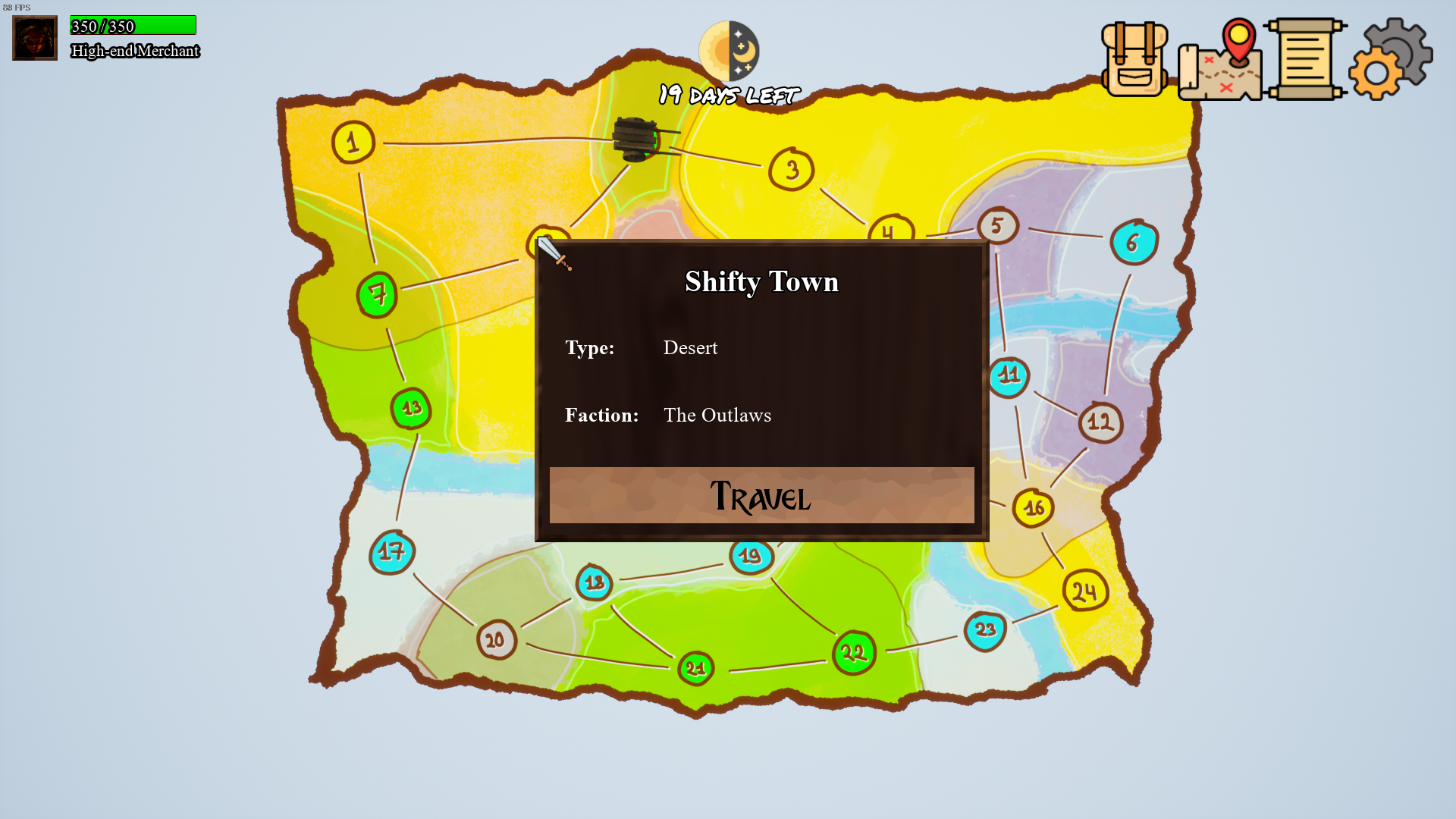
All 4 components are spawned from a blueprint I made called "Interactive Map Spawner", it can be dragged into any and a map will "unpackage" itself when the game is running.
Current village ID is stored in the Game Instance so it doesn't get lost going from level to level.
When the player clicks on a village, the "Village Info UI" will appear.
It will have a "Travel" button if it's one of adjacent villages of a current one, and I ensured that the UI element will not go over screen boundaries.
On a "Travel" button click, the game calculates time that it will take to travel, rolls for combat and event occurrences and then saves the game.
Save & Load
Well, nothing fancy here, it is a Save system.
We made several SaveGame objects for each system that needed it, then we made a "parent" SaveGame object that saves each of the smaller ones at necessary places and times.
Quests
The biggest system on par with a Shop - Quests system.
Each village can generate quests at a Quest board and draws them from a pool of quests in a specific Data Table.
Each quest can be one of 4 types, as mentioned in the "Gameplay Design" section above.
A quest is a Struct that consists of:
- [Name] Name
- [Enum] Type
- [Enum] Status
- [Text] Description
- [Int] Time to complete
- [Int] Reward in Gold
- [Int] Failure in Gold
And additional type-specific variables, like items for delivery, ID of NPC for excort, etc.
Rewards are not preset and are based on a distance between a current village and a random destination of a quest.
I had to implement the Dijkstra algorithm to calculate optimal distance between 2 villages in order for it to work.
Sounds
More in detail you can read about sounds in a "Sound Design" section below, but one thing I can mention here is a music "player".
In the Village Game Mode object, I made a system that, based on a current village type, selects one of 4 specific Data Tables that contains music in the form of FMOD events. It randomizes the order and places them in a queue.
The same goes for combat music and the Combat Game Mode object.
Then, I made a function that stops and releases FMOD events and is called when the player travels to another level.
Current village ID is stored in the Game Instance so it doesn't get lost going from level to level.
When the player clicks on a village, the "Village Info UI" will appear.
It will have a "Travel" button if it's one of adjacent villages of a current one, and I ensured that the UI element will not go over screen boundaries.
On a "Travel" button click, the game calculates time that it will take to travel, rolls for combat and event occurrences and then saves the game.
Save & Load
Well, nothing fancy here, it is a Save system.
We made several SaveGame objects for each system that needed it, then we made a "parent" SaveGame object that saves each of the smaller ones at necessary places and times.
Quests
The biggest system on par with a Shop - Quests system.
Each village can generate quests at a Quest board and draws them from a pool of quests in a specific Data Table.
Each quest can be one of 4 types, as mentioned in the "Gameplay Design" section above.
A quest is a Struct that consists of:
- [Name] Name
- [Enum] Type
- [Enum] Status
- [Text] Description
- [Int] Time to complete
- [Int] Reward in Gold
- [Int] Failure in Gold
And additional type-specific variables, like items for delivery, ID of NPC for excort, etc.
Rewards are not preset and are based on a distance between a current village and a random destination of a quest.
I had to implement the Dijkstra algorithm to calculate optimal distance between 2 villages in order for it to work.
Sounds
More in detail you can read about sounds in a "Sound Design" section below, but one thing I can mention here is a music "player".
In the Village Game Mode object, I made a system that, based on a current village type, selects one of 4 specific Data Tables that contains music in the form of FMOD events. It randomizes the order and places them in a queue.
The same goes for combat music and the Combat Game Mode object.
Then, I made a function that stops and releases FMOD events and is called when the player travels to another level.
And yes, the game has bugs, it even crashes sometimes, I will not deny that.
We tried to fix that as much as we could before the project ended, and the game is in a much better state than it was, but clearly it was not enough.
We tried to fix that as much as we could before the project ended, and the game is in a much better state than it was, but clearly it was not enough.
Sound Design & Implementation
Overall
Areas
This was by far my biggest project in terms of Sound Design yet.
The list of areas I had to cover is as follows:
- Background music for each village location type
- Background ambience for each level
- UI audio feedback
- Combat Moves' audio feedback
Unfortunately, the last point couldn't be made in time without other sacrifices, so we made a decision to cut it as it wasn't affecting players significantly.
Workflow
The usual routine I had was something like:
1. Find sounds on the internet
2. Document them
3. Edit them in Audition
4. Set them up as events in FMOD
5. Plug FMOD events to objects/systems in UE4
Sometimes, additional tinkering in FMOD was required.
Overall
Areas
This was by far my biggest project in terms of Sound Design yet.
The list of areas I had to cover is as follows:
- Background music for each village location type
- Background ambience for each level
- UI audio feedback
- Combat Moves' audio feedback
Unfortunately, the last point couldn't be made in time without other sacrifices, so we made a decision to cut it as it wasn't affecting players significantly.
Workflow
The usual routine I had was something like:
1. Find sounds on the internet
2. Document them
3. Edit them in Audition
4. Set them up as events in FMOD
5. Plug FMOD events to objects/systems in UE4
Sometimes, additional tinkering in FMOD was required.
Music & Ambience
Music
Music
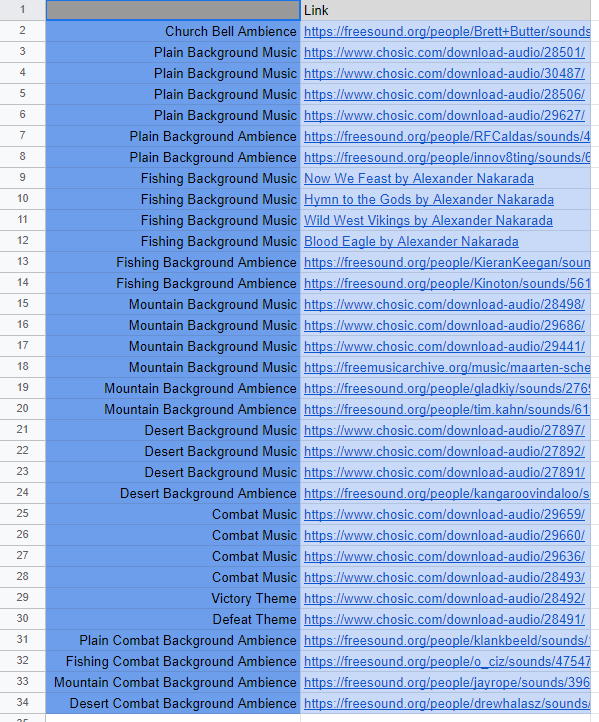
Everything is documented!
Obviously, we didn't have time to record soundtracks on our own, so I had to pick and choose royalty-free music available on the internet.
My goal was to provide a unique vibe for each location type (desert, plain, fishing and mountain).
Since from the narrative standpoint each type was influenced by specific culture, I knew what to look for.
The search was tedious but fruitful in the end - each village type has 3-4 musical pieces that are on shuffle.
Ambience
Background ambience was a bit different because it had to be specific for each level rather than just a type.
But because by that point each level had been built by level designers, it was just a matter of time to research some free ambience on the internet.
A lot of it had to be cut and processed through Audition to make it acceptable for a medieval setting.
The Art of *click*
Approach to UI
UI has to be responsive, part of it lays on audio feedback.
After solidifying the UI's visual style, I had the most important task throughout the entire project - to make click sound satisfying.
I decided to use wooden collision with objects as a baseline, since the visual style was all about wood and metal.
Click Sounds
In Audition I cut, corrected pitch and merged original sound clips into 3-part addictive click sound that I am proud of.
Each button of the main UI also has its own twist on click sound:
- Map has horse gallop sound
- Inventory has stuffed-backpack-being-delved sound
- Quests button has paper noise sound added
To reduce repetitiveness, I added pitch modulation to them in FMOD.
Approach to UI
UI has to be responsive, part of it lays on audio feedback.
After solidifying the UI's visual style, I had the most important task throughout the entire project - to make click sound satisfying.
I decided to use wooden collision with objects as a baseline, since the visual style was all about wood and metal.
Click Sounds
In Audition I cut, corrected pitch and merged original sound clips into 3-part addictive click sound that I am proud of.
Each button of the main UI also has its own twist on click sound:
- Map has horse gallop sound
- Inventory has stuffed-backpack-being-delved sound
- Quests button has paper noise sound added
To reduce repetitiveness, I added pitch modulation to them in FMOD.
Art Direction
Why it is the way it is?
My Approach
Lack of any artists within our team led us to a decision to select one of us to be responsible for Art Direction, since I already had experience with it and enjoyed it, I've suggested myself for that role.
Before me laid several issues that I needed to approach:
- General style needs to be defined
- UI style needs to be defined
- No one can make proper assets at reasonable pace
- Many assets we had were from different packs and needed to be unified
- Each village type had to be visually distinctive
Art Style
Since the setting for the game has been set, initial narrative has been developed and most of the assets we were going to use have been known to us, I've made a decision for the Art Direction to take not so realistic but not yet cartoon-ish route.
It turned out like this:
Why it is the way it is?
My Approach
Lack of any artists within our team led us to a decision to select one of us to be responsible for Art Direction, since I already had experience with it and enjoyed it, I've suggested myself for that role.
Before me laid several issues that I needed to approach:
- General style needs to be defined
- UI style needs to be defined
- No one can make proper assets at reasonable pace
- Many assets we had were from different packs and needed to be unified
- Each village type had to be visually distinctive
Art Style
Since the setting for the game has been set, initial narrative has been developed and most of the assets we were going to use have been known to us, I've made a decision for the Art Direction to take not so realistic but not yet cartoon-ish route.
It turned out like this:
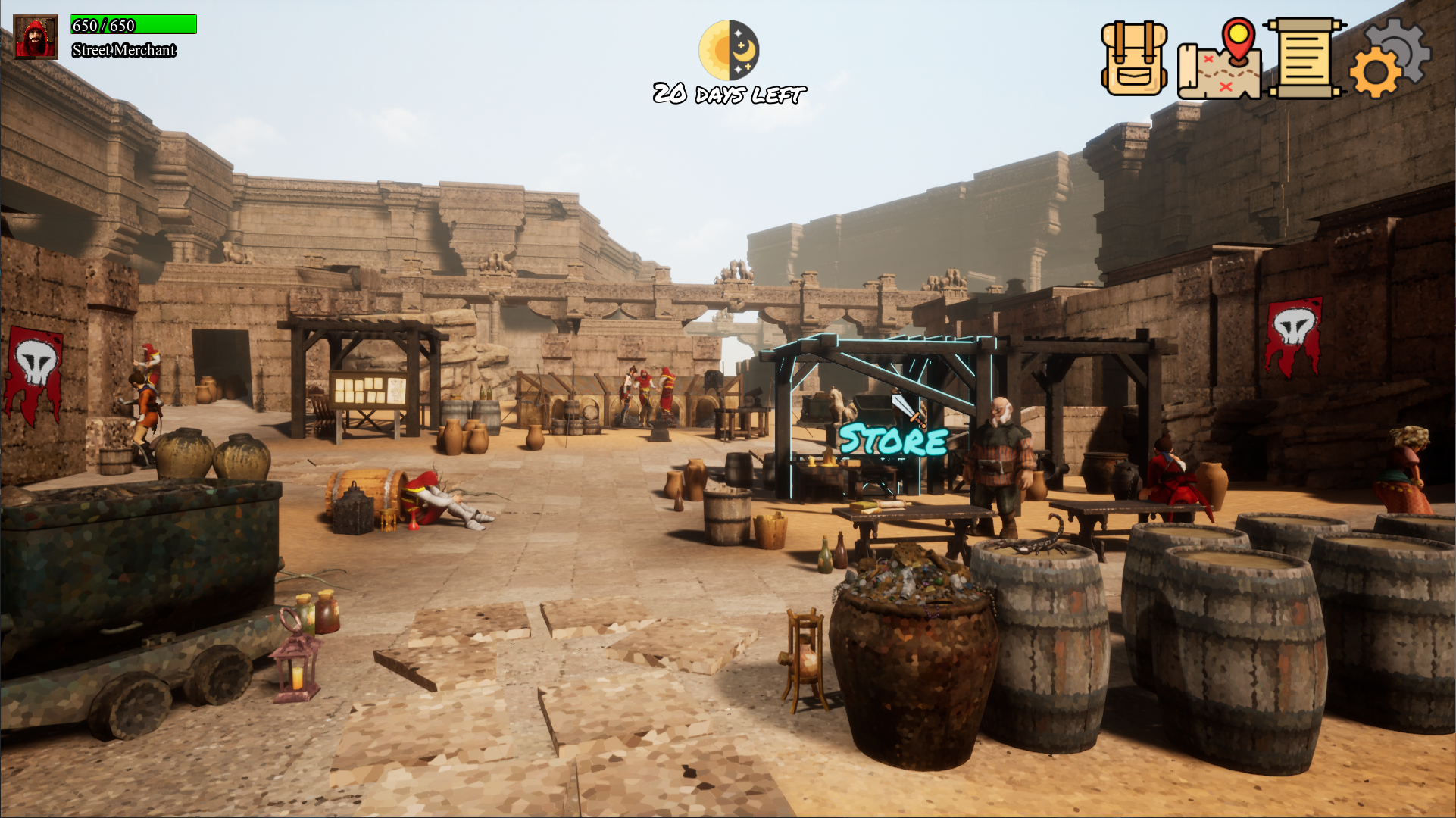
Our Disctinct Visuals
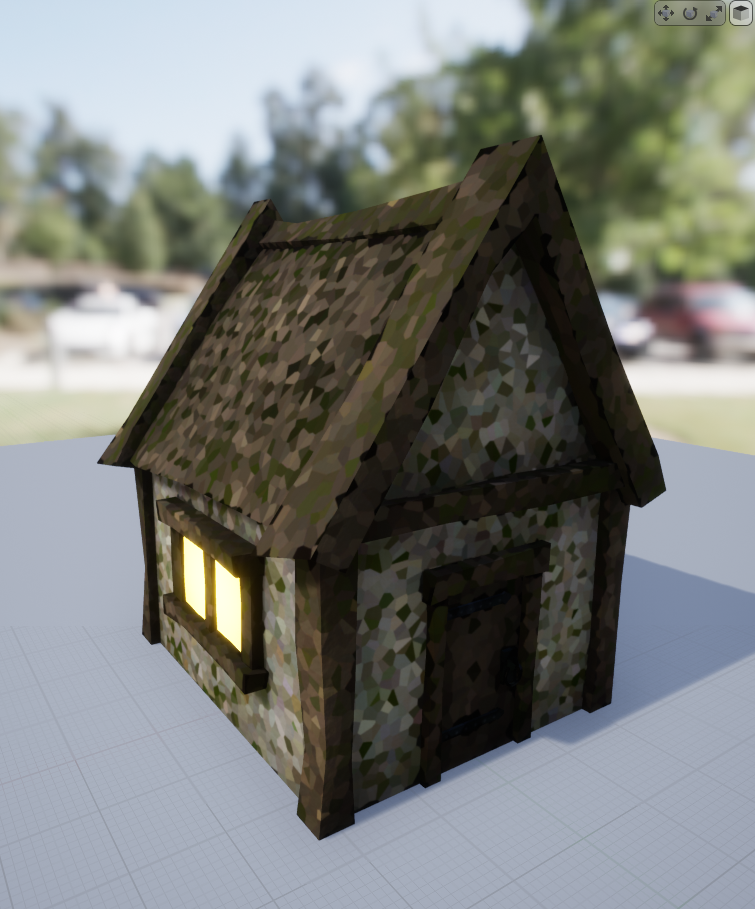
First Attempt
One Shader to Rule Them All
To solve the issue of difference in styles within asset packs, I've come up with the idea of applying a stylized shader to (almost) every asset and surface, so everything looks at least somewhat coherent.
To solve the issue of difference in styles within asset packs, I've come up with the idea of applying a stylized shader to (almost) every asset and surface, so everything looks at least somewhat coherent.
After playing with filters in Photoshop, I've stumbled upon Voronoi noise and how Photoshop can make any image look the same way. I've manually modified a texture of one of our assets, re-imported it to test it in-engine and the result was great.
But re-making each texture of the project seemed like a task that can be done otherwise.
Solutions
With a help of a mentor, that idea came to life in a form of the Material Function.
This is how it looks in UE4:
But re-making each texture of the project seemed like a task that can be done otherwise.
Solutions
With a help of a mentor, that idea came to life in a form of the Material Function.
This is how it looks in UE4:

This Material Function allows to tinker the scale of each cell, which I've done with some materials to make them better fit the overall picture.
How UI looks
Reasons to "Why?"
The game has many items that need to be represented with icons.
Due to the same reasons, I've decided to research free icons on the internet.
Most of them were simple, minimalist, so I went in that direction.
After our UX designer laid out a mockup of the UI in Figma, I made a huge list of each icon we might need, so I can keep track of them and correctly attribute them later.
Some of them required color correction to better fit the overall style.
UI Style
Additionally. because the game explores medieval theme and trading, I thought it would be appropriate to give UI some wooden and metal texture.
Behold, the Shop UI:
Reasons to "Why?"
The game has many items that need to be represented with icons.
Due to the same reasons, I've decided to research free icons on the internet.
Most of them were simple, minimalist, so I went in that direction.
After our UX designer laid out a mockup of the UI in Figma, I made a huge list of each icon we might need, so I can keep track of them and correctly attribute them later.
Some of them required color correction to better fit the overall style.
UI Style
Additionally. because the game explores medieval theme and trading, I thought it would be appropriate to give UI some wooden and metal texture.
Behold, the Shop UI:

It was our first time exploring UI solutions that UE4 offers.
Truth be told, due to complexity and alien nature of it (compared to the rest of UE4), it was our pain point and a big challenge to overcome for UI designers.
Special thanks to Mr. S for developing UI with me and helping me with it.
Truth be told, due to complexity and alien nature of it (compared to the rest of UE4), it was our pain point and a big challenge to overcome for UI designers.
Special thanks to Mr. S for developing UI with me and helping me with it.
Thanks to the making of this website, I was familiar with the logic behind different layers, classes, etc. and in the end, we somehow managed to get used to it, but the learning experience was still rough.